
Published at: 2026-01-07 06:00
Set / Triptych
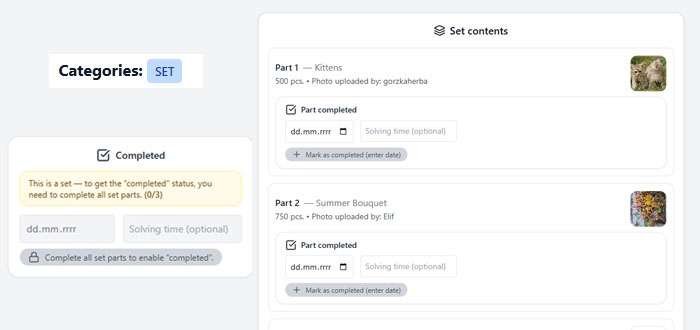
Alright — today I’m explaining what the Set and Triptych categories are all about 👇
I finally sat down and polished this so you can mark everything clearly and correctly.
I finally sat down and polished this so you can mark everything clearly and correctly.
🔹 SET
If a puzzle box contains more than one image, we call it a set, and that’s the category you should assign.
From now on, to mark such a box as completed:
➡️ you first need to mark the completion of each individual part.
➡️ you first need to mark the completion of each individual part.
This works similarly to regular puzzles:
- you mark the date
- optionally the solving time
👉 Only after all parts of the set are marked as completed, the full box completion will appear
(using the most recent date of the completed parts).
(using the most recent date of the completed parts).
📸 If you want to upload a photo of the completed puzzles, you still use the “report data issue” option.
Thanks to this solution:
- you can track your completions more precisely
- even if you’re missing one image from the box, the completion still counts toward your statistics
📊 For sets, statistics count individual parts, so for example:
- completing a 500-piece part
- adds 500 pieces to your total
- adds 1×500 to your favorite piece count
➕ ADDING A SET
When adding puzzles to the database, you won’t notice any difference —
there’s no extra field, you just need to remember to select the correct category.
there’s no extra field, you just need to remember to select the correct category.
Once you add a puzzle with the “set” category:
- additional options related to set parts will appear in edit mode
(if the puzzle is still pending)
If you want to help speed up the approval process, it’s great if you fill those in 😜
🔹 TRIPTYCH
This is similar to a set, but it’s an exception, which is why it has its own category.
Even though there are 3 images (sometimes more):
- ❌ there is no division into parts
- ✅ the puzzle is treated as one whole
BUT 👀
📊 statistics are split.
📊 statistics are split.
Example:
👉 a triptych 500 + 1000 + 500
👉 a triptych 500 + 1000 + 500
- statistics will count 2×500 and 1×1000
- a total of 3 completed puzzles
- even though it’s 1 box
➕ ADDING A TRIPTYCH
Just like before:
- nothing changes during the initial adding process
- you only need to select the correct category
For pending puzzles:
- you can enter edit mode
- this time you’ll see additional fields next to the piece count
✍️ Fill them in starting from the largest piece count, for example:
- 1000, 500, 500
This again speeds up approval,
but if you don’t edit it — nothing bad happens. I’ll do it someday 😝
but if you don’t edit it — nothing bad happens. I’ll do it someday 😝
If you have any questions or suggestions, feel free to let me know 🙃